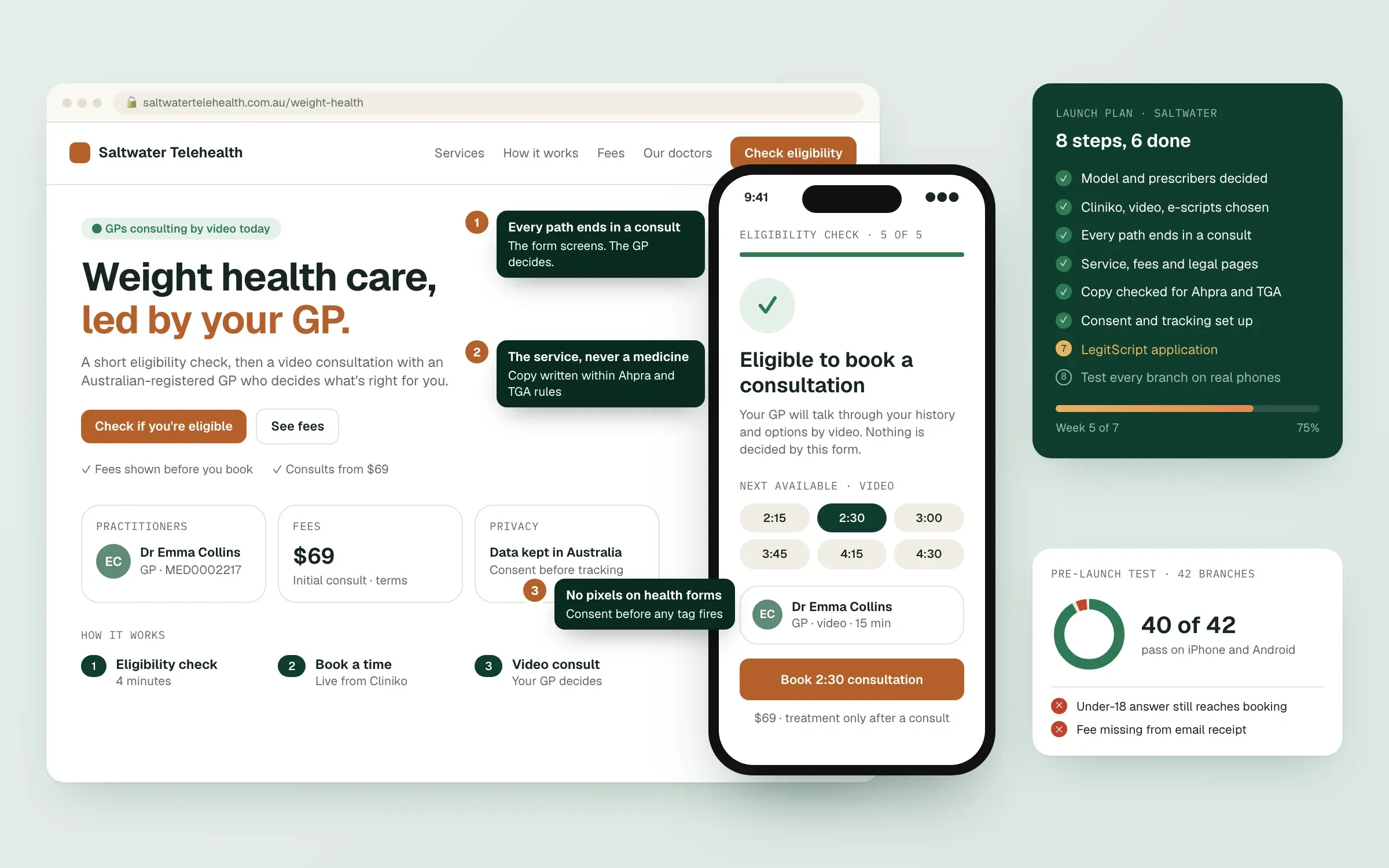
Most telehealth clinics we meet started with a logo and a homepage design. That's backwards. The decisions that shape a telehealth site are clinical and technical: what services you offer, who prescribes, which practice platform runs the clinic, and how patients get from a search result to a real-time consultation. Get those right and the website follows. Get them wrong and you rebuild. This read walks through a telehealth clinic launch in the order we build it, from the first decisions to the week before go-live. It replaces our earlier "first 30 days" read.
Step 1: Decide the model
Before design, write down in one page:
- Services you'll offer by telehealth, and what you won't
- Who prescribes, and whether prescribing is part of the model at all
- Billing: bulk billed, private or mixed (see bulk billing, private billing or mixed)
- Where you serve: Australia only, any state limits
- Advertising: will you run Google Ads (which means LegitScript)?
Every later decision refers back to this page. Your clinical lead and lawyer should agree with it.
Step 2: Choose the systems (the day-one stack)
| System | What it does | Notes from our builds |
|---|---|---|
| Practice management platform | Records, appointments, billing, often prescribing | MediRecords for fully custom journeys; Cliniko for a clean API; Halaxy for a fast, low-cost start |
| Video consults | Real-time consultations | Built into Cliniko and Halaxy; MediRecords connects to Coviu |
| E-prescribing | Electronic prescriptions | Built into MediRecords; Cliniko connects an app such as Parchment |
| Website and patient area | Service pages, questionnaire, booking, dashboard | Usually Next.js with a backend that talks to the platform |
| Payments | Consultation fees | A payment provider, confirming bookings only after payment |
| Medicare claiming | Bulk bill and patient claims | Inside the platform, or through Tyro Health for Cliniko |
| Email and SMS | Confirmations and reminders | One sender, consistent wording |
| Consent and analytics | Measuring without leaking health data | Consent first, no tags on health forms |
The platform choice is the big one. Our Halaxy, Cliniko or MediRecords comparison explains how we choose.
Step 3: Design the patient journey
The Medical Board doesn't support prescribing without a real-time consultation, so the journey always runs: service page, eligibility questionnaire, choose a time, pay for the consultation, real-time video or phone consult, follow-up. Our read on booking flows that meet Medical Board guidelines goes step by step.
The intake questionnaire deserves its own design time: what it excludes, what it flags for the practitioner and what it collects.
Step 4: Build the pages
- Home: who you are, what you help with, how it works, who you'll see
- Service pages: one per service, led by the condition or goal, never a medicine
- How it works: questionnaire, consult, what happens after
- Practitioners: names, roles, Ahpra registration
- Pricing: consultation fees, Medicare position, consistent everywhere
- FAQs: real questions, consistent with the Terms
- Legal: Terms, Privacy Policy, collection notice, complaints
- Contact: a working phone and email, and an emergency notice
Step 5: Write within the rules
- Ahpra: no testimonials or review widgets, no superiority claims, no urgency, terms on any offer.
- TGA: no prescription medicine names, nicknames or pictures, anywhere in the site or its code. Promote the consultation.
- Safety: "if this is an emergency, call 000", crisis lines on relevant pages, "treatment isn't guaranteed".
Step 6: Privacy and tracking
Health service providers are covered by the Privacy Act regardless of size. Keep tracking off health forms, block tags until consent, send form data straight to the platform, and write a privacy policy that names your systems. From 10 December 2026, describe any automated decisions your questionnaire makes.
Step 7: Advertising readiness
If you'll advertise on Google, you need LegitScript and Google's healthcare certification first, and your landing pages can't promote prescription drug terms. Build the site to pass that review from day one.
Step 8: Test, then launch
Run every questionnaire branch, book real test appointments in the platform's test mode, check every phone link and email, and test on real phones. Our telehealth website launch checklist is the list we use.
A realistic timeline
For a clinic with its model and platform decided, a focused first version often takes six to ten weeks of build and testing, depending on how custom the booking and patient area are. Most delays come from waiting on content, clinical sign-off and legal pages, not the build.
Ready to plan your launch? Start on Connect.
Finished this read?
- OpenedToday
- FinishedNot yet
Written by
Kevin MatthewsHead of Development
Kevin leads engineering at SingletonTec and has spent 10+ years building production-grade websites, apps and systems for businesses.