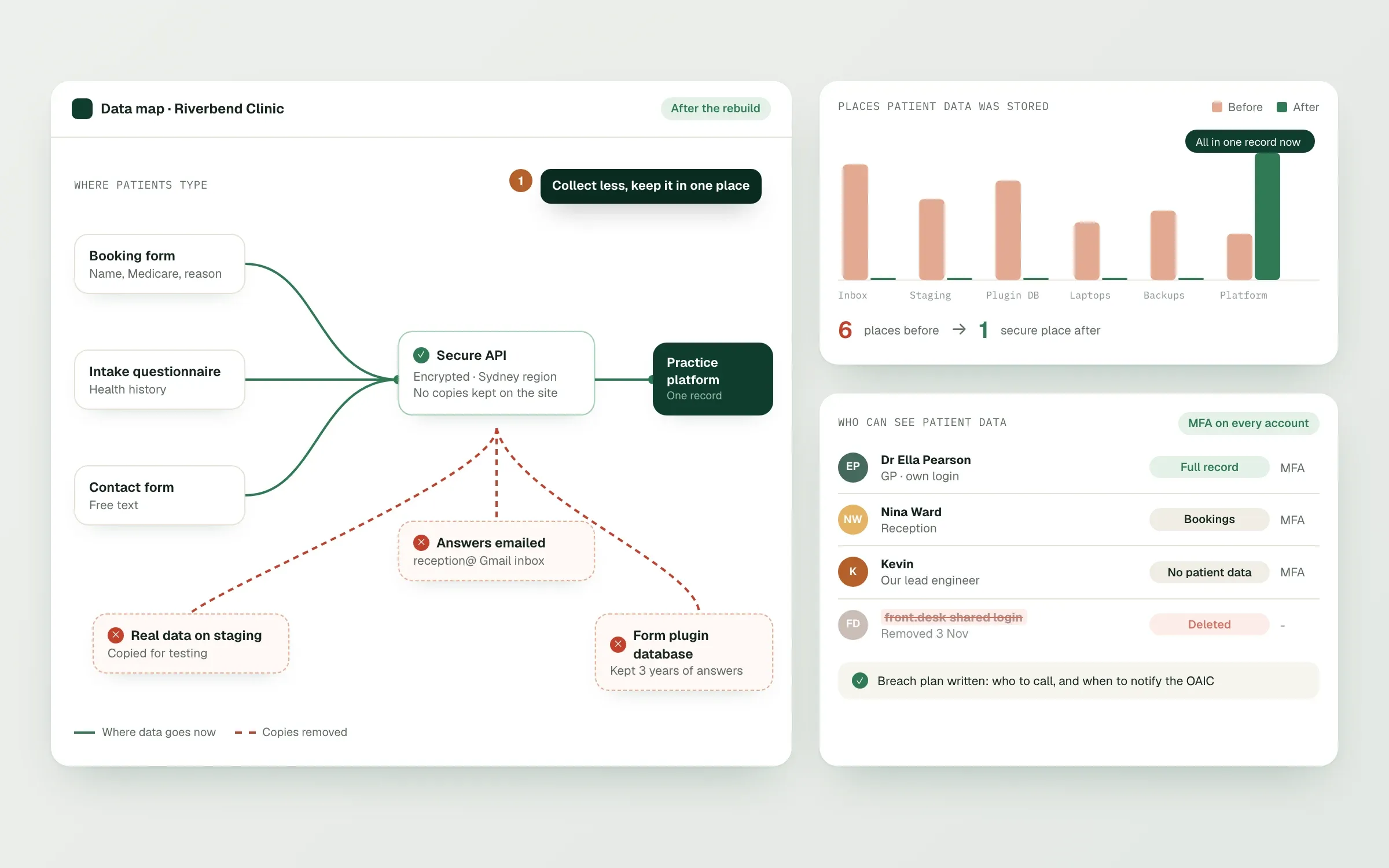
When clinics ask us about website privacy, they usually mean hackers. Hackers are real, but most of the problems we find are much more ordinary. A contact form that emails health questions to a Gmail inbox. A Meta Pixel on the weight loss page. A staging site, indexed by Google, filled with real patient test data. An admin login shared by four people with no two-factor. This read follows patient data through a typical clinic site, shows where it leaks, and explains what we build instead. It replaces our earlier read on this topic, updated for what changed in 2026.
The rules, briefly
Health service providers that hold health information are covered by the Privacy Act regardless of turnover, and health information is sensitive information, which carries stricter rules on collection, use and disclosure. Three developments make this more pressing now:
- Tracking pixels. In June 2026 the Privacy Commissioner found two health providers, one a telehealth service, breached the Privacy Act through pixels on their websites. Our read on tracking pixels on health websites covers the details.
- Automated decisions. From 10 December 2026, privacy policies must describe significant decisions made or shaped by software, which can include eligibility questionnaires.
- A statutory tort for serious invasions of privacy, which gives individuals a direct right to sue for serious invasions of privacy, has applied since mid-2025.
Follow the data: where it goes on a clinic site
| Point | What we often find | What we build |
|---|---|---|
| Contact form | Health questions emailed to a shared inbox | A "Contact us" form for general enquiries, with a warning not to send health details; health questions go through the booking flow |
| Intake questionnaire | Answers stored in a form plugin's database, sometimes overseas | Answers sent straight to the practice platform over HTTPS; nothing kept in the CMS |
| File uploads | Photos and documents in a public media folder | Uploads to private storage with short-lived links, then into the patient record |
| Booking | Booking embed plus analytics tags on the same page | No ad or analytics tags on booking steps |
| Emails and SMS | Health details in confirmation emails | Confirmations with time, practitioner and link only |
| Patient portal | Long sessions, shared devices | Timeouts, secure login and access only to the patient's own record |
| Staging site | Real data, publicly reachable, sometimes indexed | Test data only, password-protected, noindex |
| Admin access | Shared logins, no two-factor | Named accounts, two-factor login, roles, removal when staff leave |
| Backups and logs | Full copies of form data in logs, unknown location | Logs without health content; known backup location |
None of that is exotic. It's just the difference between a site built for a café and one built for a clinic.
Collect less
The safest data is data you never collect. Every field on a form should earn its place. Our questionnaire work starts by sorting every question into Exclude, Flag or Collect, and cutting anything that does none of them. Our telehealth prescreening questionnaire read goes into this in depth. The same thinking applies to the contact form: name, contact details and a general message. Nothing clinical.
Keep it in one secure place
Patient information should live in your practice platform (Halaxy, Cliniko, MediRecords or similar), not spread across the website CMS, a form plugin, an email inbox and a spreadsheet. We build the website to pass information through to the platform and keep nothing on the way. That makes access, correction and deletion requests answerable, and it makes a breach much smaller if one happens.
Know where it's hosted
Ask where every system that touches patient data is hosted, including backups. If anything leaves Australia, your privacy policy has to say which countries and how it's protected. We document this for each build so your adviser can write an accurate policy; the checklist is in telehealth privacy policy pages.
Control who can see it
- Named accounts for everyone, never shared logins
- Two-factor login on the CMS, hosting, practice platform and email
- Roles: a marketing contractor doesn't need access to forms data
- A leaver process that removes access the same day
Plan for a breach
Under the Notifiable Data Breaches scheme, an eligible data breach has to be assessed and reported. The practical preparation is technical: know what systems hold what data, keep logs that show who accessed what, and have a named person who decides. A breach plan written after the breach isn't a plan.
Measure marketing without risking patients
You can still know which campaigns bring bookings. Load analytics after consent, keep tags off forms and booking steps, and count bookings server-side without health details. We cover the set-up in the tracking read linked above.
If you'd like us to map how data moves through your site, start on Connect.
Sources
All checked 21 Nov 2026.
- Guide to health privacy, OAIC
Finished this read?
- OpenedToday
- FinishedNot yet
Written by
Kevin MatthewsHead of Development
Kevin leads engineering at SingletonTec and has spent 10+ years building production-grade websites, apps and systems for businesses.