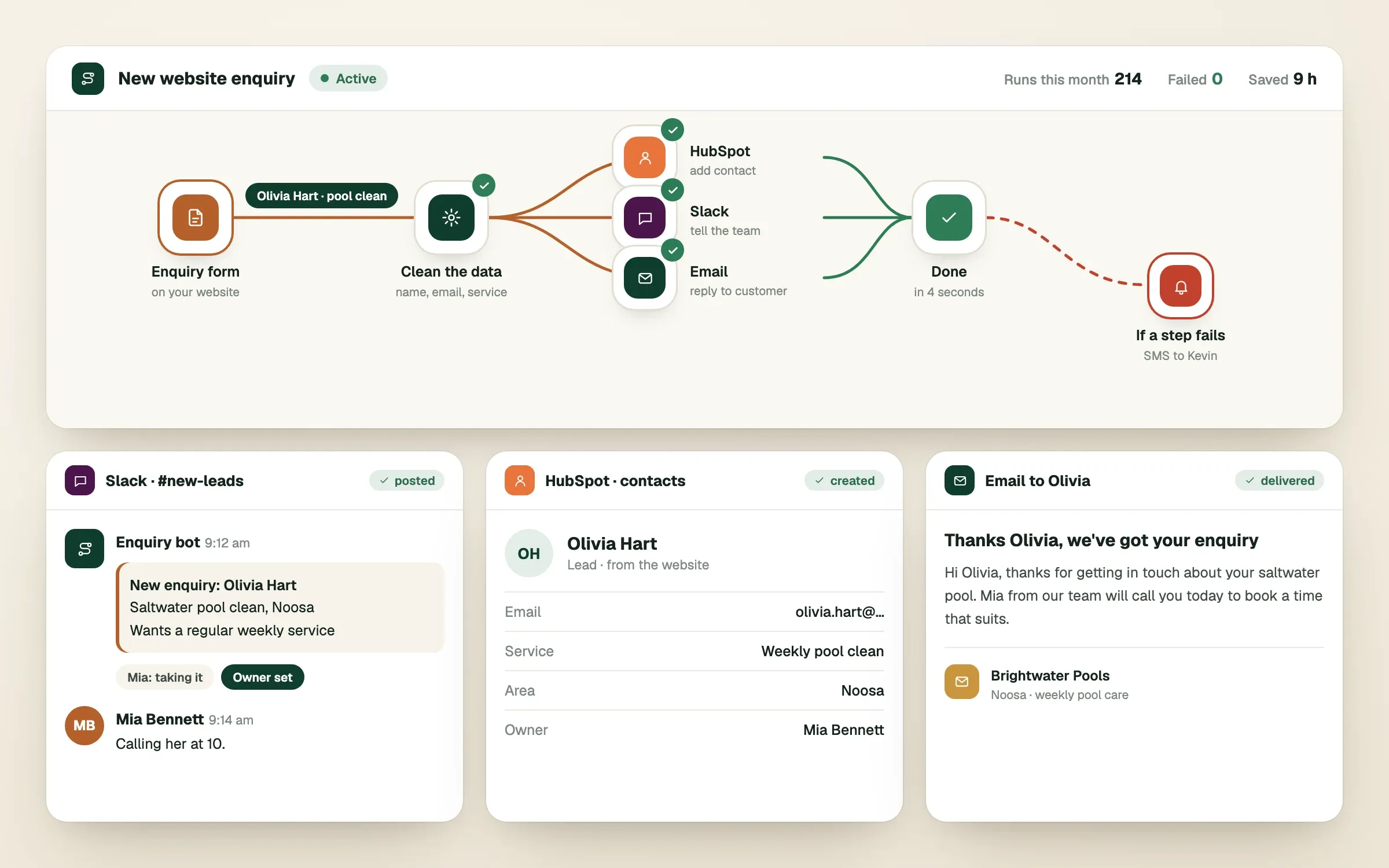
Business process automation for small business means telling your software to do the copying, pasting and reminding that people currently do by hand. A form is submitted, and the lead lands in your CRM, your team is pinged in Slack and the customer gets a confirmation, all without anyone touching it. This guide explains how that works, what n8n is, and how to choose what to automate first.
What is business process automation?
Business process automation is a rule you set once so your tools do a repeated job for you. Every automation has the same three parts: a trigger (something happens), steps (what should follow) and an outcome (the job is done). "When a customer pays an invoice in Stripe, mark the job as paid in our system and email a receipt" is one complete automation.
You do not need AI for this. Most useful automation is plain rules. AI becomes a helpful extra when a step needs to understand words, such as reading an enquiry and deciding whether it is a sales question or a support request.
What is n8n, and how is it different from Zapier and Make?
n8n (pronounced "n-eight-n") is a workflow automation tool that connects apps and lets you build automations on a visual canvas. Zapier and Make do the same basic job. All three have ready-made connections to hundreds of everyday tools, so a trigger in one app can start steps in another.
The differences that matter to a business owner are cost, control and where your data lives. n8n can be run on a server you control, or on n8n's hosted plan, which suits businesses that want more control over their data and costs. Zapier and Make are hosted by the vendor, usually quicker to start with, and their pricing is based on how many tasks you run, which can climb as you grow. Check each vendor's current pricing before deciding.
| n8n | Zapier | Make | |
|---|---|---|---|
| Where it runs | Your own server or n8n's hosted plan | Vendor's cloud | Vendor's cloud |
| Best for | Complex workflows, custom logic, more data control | Quick, simple connections | Visual builders who want more flexibility than Zapier |
| Learning curve | Steeper | Gentle | Moderate |
| Cost pattern | Often lower at high volume | Grows with task volume | Grows with operations |
We use n8n often because we can build custom logic, connect it to your own systems through an API (a standard way for software to talk to other software), and keep your data where you want it. It is a tool, not a religion. If Zapier fits your job better, we will say so.
Which tasks should you automate first?
Automate the tasks that are frequent, follow clear rules and make your team groan. If a job happens many times a week, always works the same way and someone dreads doing it, it is a strong candidate. If it needs judgement or a human relationship, leave it alone.
Here are some examples of what small businesses commonly automate.
| Trigger | What the automation does |
|---|---|
| A website enquiry form is submitted | Adds the contact to HubSpot, posts to Slack, sends a confirmation email |
| A Shopify order is placed | Sends the order to your stock system such as Cin7 and updates inventory |
| A Stripe payment succeeds | Marks the invoice paid, emails a receipt, notifies your team |
| A new customer signs up | Adds them to your email list and creates their account record |
| A review comes in | Alerts the right person and drafts a reply for approval |
A checklist before you automate anything
// checklist0 of 5 done
What goes wrong with automations?
Automations usually fail quietly. A connection expires, an app changes its settings or a field comes through empty, and the automation stops without anybody noticing until a customer complains. Plan for that from day one.
The other common problems are predictable. Automations built on a free trial account that later expires. Workflows that only one person understands. Messy data going in, so messy data comes out. Fixing these is mostly about habits: name things clearly, keep a short written description of what each automation does, and test with real examples before you switch it on.
Who should own your automations?
Your business should own every account, workflow and password involved, not the person or supplier who built them. If an automation runs through someone else's personal account, you are one resignation or one dispute away from losing it.
Ask whoever builds yours for three things: the accounts are in your business name, the workflows are documented, and you have full access. This is the same principle as owning your domain name and your website, and it protects you if you ever change suppliers. When we build automations we set them up in accounts you own and share the documentation, because work you cannot see or control is not really yours.
When you are ready to take on something bigger than a single connection, you work directly with a lead engineer who maps the steps with you, agrees the plan in writing and builds exactly that. Custom automations are engineered for the way your business runs, not squeezed into a template.
Finished this read?
- OpenedToday
- FinishedNot yet
Written by
Kevin MatthewsHead of Development
Kevin leads engineering at SingletonTec and has spent 10+ years building production-grade websites, apps and systems for businesses.