The technical SEO checklist for small business websites

A tick-box technical SEO checklist for small business websites, explained in plain words: can Google find you, is your site fast and safe, and is it clearly labelled.

Written by Kevin MatthewsHead of Development

Checklist5 min read

Start reading
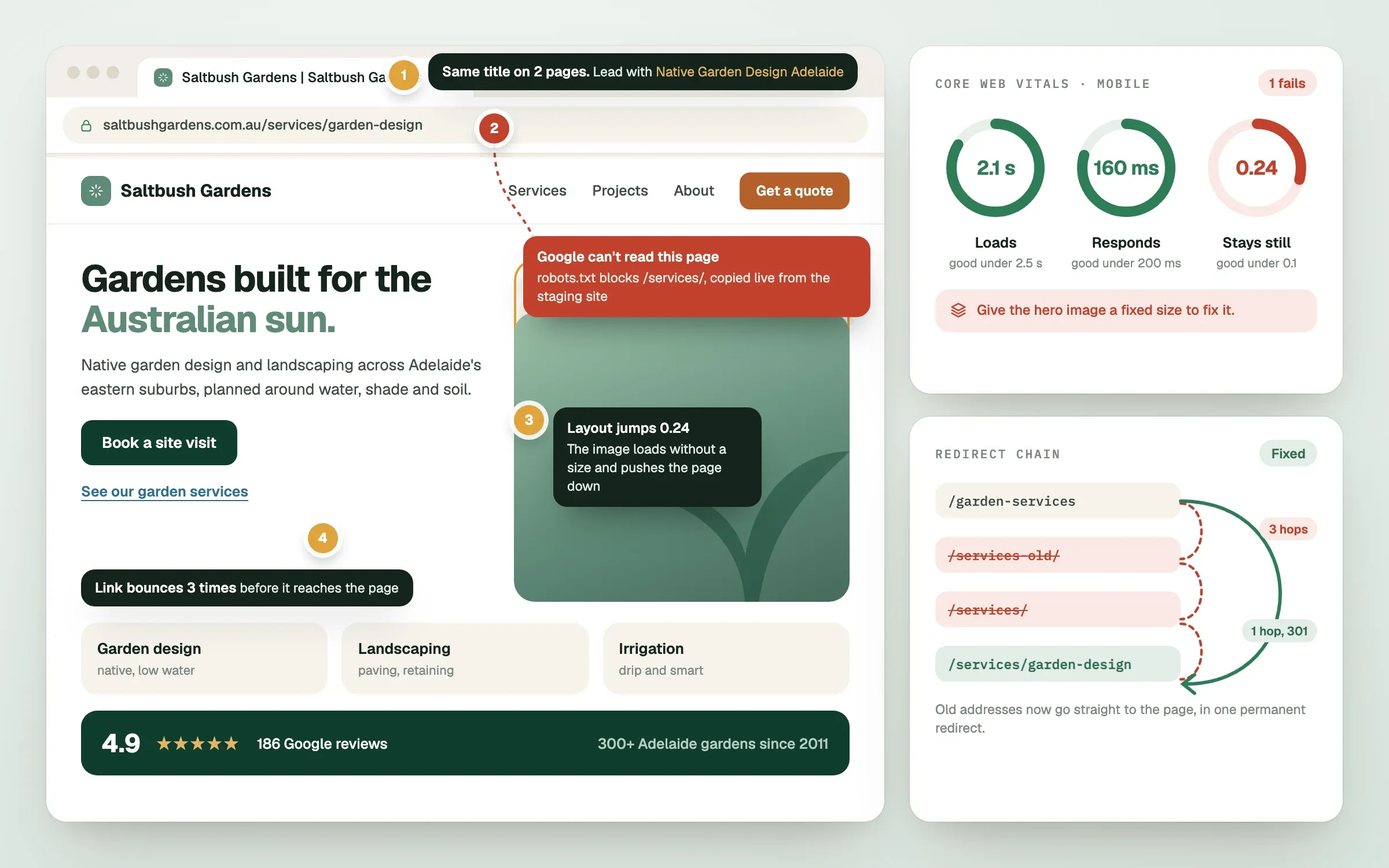
Technical SEO checklist: a site audit flagging robots.txt blocks, duplicate titles, Core Web Vitals and a redirect chain fixed
The technical fixes that stop Google from reading, ranking or loading your pages properly.

A technical SEO checklist is a list of behind-the-scenes checks that make sure search engines can find, read and trust your website. Think of it as the plumbing: nobody admires it, but nothing works well when it leaks. Work through the five groups below in order, and tick each item as you confirm it. Many small business sites have a few unticked boxes, and that is normal.

Can Google find and read your pages?

If search engines cannot reach a page, nothing else you do for it matters. Start here.

// checklist0 of 7 done

Is your site fast and stable?

Speed is part of how Google judges the experience, and a slow page loses visitors before it loses rankings. Google measures this with Core Web Vitals, three scores for how fast the main content appears, how quickly the page responds when tapped, and how much it jumps around while loading.

// checklist0 of 7 done

Is it mobile friendly and secure?

Google mainly judges the mobile version of your site, and visitors expect a safe connection.

// checklist0 of 5 done

Is every page clearly labelled?

These are the labels that tell search engines and AI tools what a page is about.

// checklist0 of 8 done

Are there errors and dead ends?

Small errors add up, especially after a redesign.

// checklist0 of 7 done

What to do with your list

Count your unticked boxes and fix them in the order above, because a blocked page makes speed work pointless. Keep the list somewhere your team can see it, and repeat the check every quarter and after any major change.

If a few items look unfamiliar, that is normal. When we build a site, a lead engineer works through this list before launch on a staging link you can review, and we share Search Console and Analytics access with you, so nothing is left as a mystery.

Finished this read?

  1. OpenedToday
  2. FinishedNot yet

Written by

Kevin MatthewsHead of Development

Kevin leads engineering at SingletonTec and has spent 10+ years building production-grade websites, apps and systems for businesses.

Ask Kevin a questionMore from the lead engineer

// questions about this read

Still wondering?Start with these.

Short answers from Kevin and the team. Not here? Ask Kevin directly.

  1. Technical SEO is making your website easy for search engines to find, read and trust. It covers things like whether pages are indexed, how fast they load, whether the site is secure and mobile-friendly, and whether pages are clearly labelled. It sits underneath your content and does not replace it.

    See how our SEO and marketing worksHow to show up in ChatGPT, Gemini and Google's AI answers

  2. The most reliable way is Google Search Console. Verify your site, then open the Pages report to see which pages are indexed and why others are not. A quick check is to search for site: followed by your web address in Google, though Search Console gives the full picture.

    Talk to an engineer about this

  3. Core Web Vitals are three measurements of real-world page experience: how fast the main content loads, how quickly the page reacts to a tap, and how steady the layout stays. They are one of many signals, so they will not rescue weak content, but a slow, jumpy page also costs you visitors who leave before they read anything.

    Website design and developmentPaying for clicks but getting no customers? Fix the page, not the ad

  4. Run a quick check every quarter, and always after a redesign, a platform change, a new plugin or a migration to a new host. Those moments are when blocks, broken redirects and speed problems usually appear.

    Analytics and strategyBook a 10-min call

  5. They overlap but are not the same. Both reward clear structure, descriptive image text and readable pages, but accessibility is about whether people with disabilities can use your site, and it carries its own legal and ethical weight.

    Website accessibility in Australia: WCAG, the law and your customersWebsite design and development