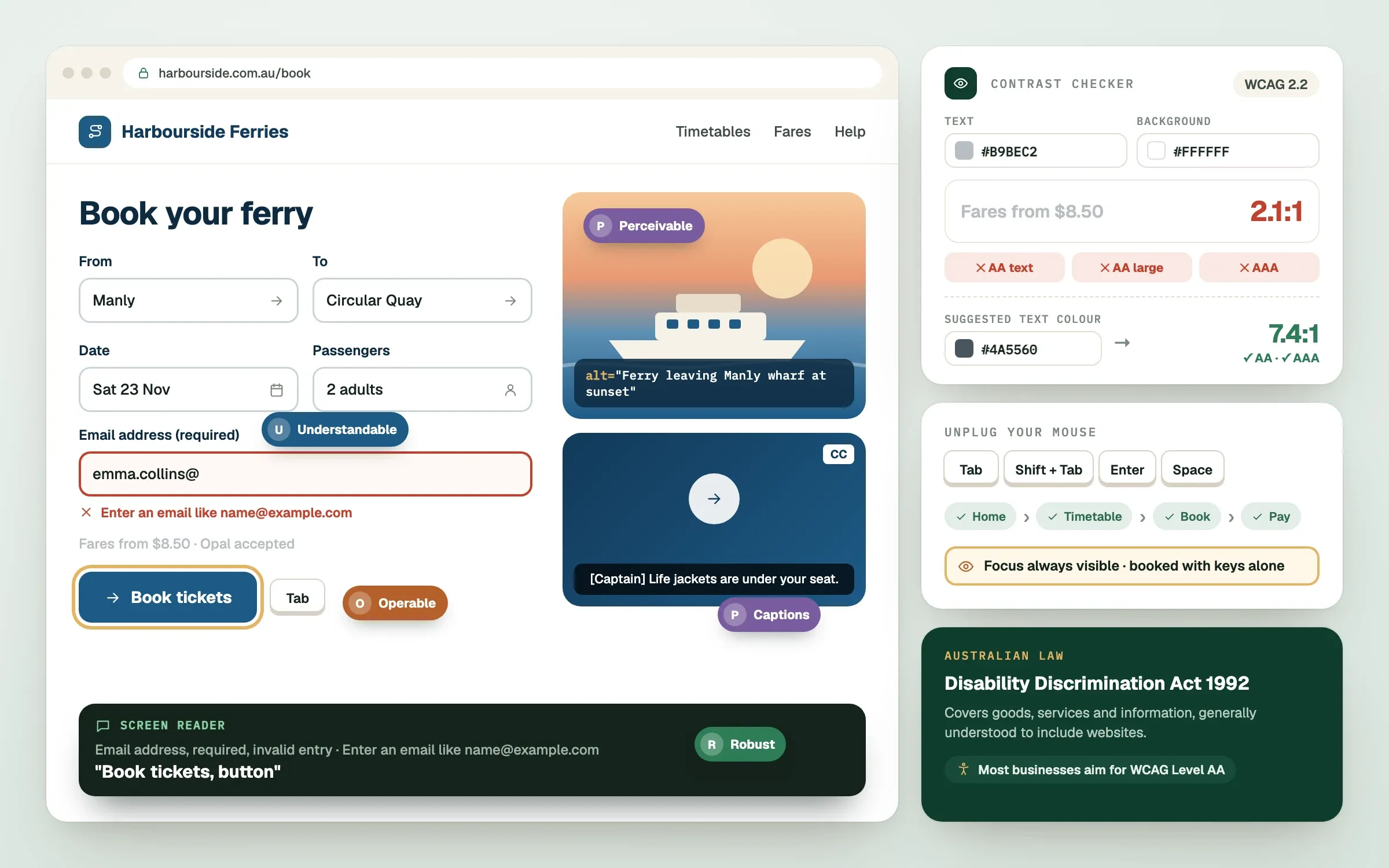
Website accessibility means building a site that everyone can use, including people who are blind, deaf, have limited movement or use assistive technology. In Australia, the standard most people point to is WCAG, the Web Content Accessibility Guidelines. This explainer covers what website accessibility in Australia involves, how the law sits behind it, and the practical steps that make a real difference to your customers.
This is general information, not legal advice. Check the current rules or speak with a qualified adviser about your situation.
What is website accessibility, and why does it matter?
Website accessibility is the practice of making a site usable by as many people as possible, whatever their abilities or devices. It matters because a site that some customers cannot use is a site that loses those customers.
Think about who this includes:
- people who are blind or have low vision and use screen readers, software that reads the page aloud
- people who are deaf or hard of hearing and need captions
- people with limited movement who use a keyboard or voice instead of a mouse
- people with cognitive differences who need clear, simple pages
- anyone on a bright phone screen, a slow connection or with a broken arm
What is WCAG?
WCAG is a set of internationally recognised guidelines, published by the World Wide Web Consortium, that describe how to make web content accessible. It is organised around four ideas, often shortened to POUR.
Perceivable. People can see or hear the content, through text alternatives for images, captions for video and enough colour contrast.
Operable. People can use the site with a keyboard, have enough time to read and are not hit with flashing content.
Understandable. Text is clear, pages behave predictably and forms explain mistakes.
Robust. The site works with different browsers and assistive technology.
WCAG has levels called A, AA and AAA. Level AA is the most common target for businesses. It is a practical, widely used standard.
Does Australian law require an accessible website?
In Australia, disability discrimination law applies to goods and services, and websites are widely understood to be part of that. The Australian Human Rights Commission has published guidance that points to WCAG as the benchmark.
Rules can differ for government bodies and for different business types, and standards can change. For that reason, treat accessibility as ongoing good practice rather than a one-time box to tick. If you are unsure about your obligations, speak with a qualified legal adviser.
What are the practical basics?
The practical basics are clear contrast, readable text, keyboard access, image descriptions and well-labelled forms. These fixes cover many of the most common problems.
Work through this checklist with your site:
// checklist0 of 10 done
How does accessibility help beyond the law?
Accessible sites tend to perform better for everyone. Clear structure helps search engines understand your pages. Good contrast helps people on phones in sunlight. Captions help people watching with the sound off.
There are business reasons to care:
- More customers. You stop turning people away without knowing it.
- Better search. Descriptive headings, alt text and clean structure are also good for SEO.
- Trust. A site that works for everyone signals care.
- Lower risk. Meeting a recognised standard reduces the chance of complaints.
Accessibility is easiest and cheapest when it is part of the build from day one. Retrofitting a finished site costs more than designing it in. Our engineers build with these basics from the start, and designers choose colour and type with contrast in mind. Templates can make this harder, because you inherit someone else's decisions.
What should you do next?
Begin with an honest audit of your current site, fix the biggest barriers first and make accessibility part of every future change. You do not need to do everything at once.
- Run a free automated check to find obvious issues.
- Test key journeys by hand, such as contact, booking and checkout.
- Fix the most serious barriers first.
- Add accessibility to your checklist for every new page.
- Revisit as your site and the guidelines evolve.
Automated tools find only part of the problems, so human testing still matters. If your site handles sensitive information, as clinics do, accessibility and privacy are worth planning together.
Finished this read?
- OpenedToday
- FinishedNot yet
Written by
Kevin MatthewsHead of Development
Kevin leads engineering at SingletonTec and has spent 10+ years building production-grade websites, apps and systems for businesses.